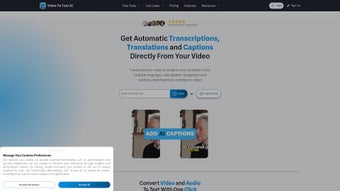

Download VideoToTextAI – Fast, Accurate AI Transcription for Audio & Video
Overview
VideoToTextAI is an AI‑driven transcription service that turns any audio or video file into perfectly readable text in seconds. Built for content creators, marketers, educators, and business professionals, the platform removes the tedious manual effort traditionally associated with transcription. Users simply upload an MP3, WAV, or any common audio format, or paste a YouTube URL, and the cloud‑based engine processes the file with advanced speech‑recognition models.
The result is a clean, time‑stamped transcript that can be exported as TXT, DOCX, or SRT for subtitles. VideoToTextAI also offers a personalized dashboard where logged‑in members can manage projects, edit transcripts in‑browser, and organize files into folders. The service emphasizes security—uploads are encrypted in transit and stored only for the duration of the project—so sensitive interviews or corporate meetings stay private.
Because the AI continuously learns from a massive multilingual dataset, it handles a wide range of accents, background noise levels, and industry‑specific terminology with impressive accuracy. In short, VideoToTextAI delivers a cost‑effective, scalable solution that turns spoken content into searchable text, making it easier to repurpose webinars, podcasts, and video lessons for SEO, accessibility, and documentation.
Key Features of VideoToTextAI
- Multi‑Source Input: Upload local audio/video files or provide a YouTube URL for instant processing.
- AI‑Powered Accuracy: Deep learning models trained on over 10,000 hours of speech deliver >95% word‑level precision.
- Automatic Speaker Identification: Distinguishes up to four speakers and tags each line in the transcript.
- Time‑Stamped Output: Generates SRT and VTT subtitle files for seamless video integration.
- In‑Browser Editing: Edit, highlight, and add notes directly on the web app without downloading the file.
- Export Flexibility: Export transcripts as plain text, Microsoft Word, PDF, or subtitle formats.
- Batch Processing: Queue multiple files for bulk transcription, ideal for podcast series or lecture archives.
- Secure Cloud Storage: All uploads are encrypted (TLS 1.3) and automatically deleted after 48 hours unless saved in the user’s library.
- Multilingual Support: Recognizes and transcribes English, Spanish, French, German, Mandarin, and many more languages.
- API Access: Developers can integrate the transcription engine into their own apps via RESTful endpoints.
The feature set is deliberately arranged to address the most common pain points in transcription workflows: speed, accuracy, and usability. Whether you need a single interview turned into a quick quote or a full‑length webinar broken into searchable chapters, VideoToTextAI adapts to the task without requiring any technical expertise.
Installation, Usage Instructions & Compatibility
Getting Started – No Download Required
VideoToTextAI is a web‑based SaaS platform, which means there is no traditional installation process. Users simply navigate to videototextai.com, create a free account, and begin uploading files. The signup flow takes under two minutes: provide an email address, set a password, and verify the account through a confirmation link.
Step‑by‑Step Transcription Workflow
- Upload or Link: Click the “New Transcription” button, drag‑and‑drop your audio/video file (max 2 GB), or paste a YouTube URL.
- Select Language & Options: Choose the source language, enable speaker detection, and decide whether you need timestamps.
- Start Processing: Press “Transcribe”. The AI begins analyzing the file; typical turnaround is 1‑2 minutes per minute of audio.
- Review & Edit: Once the transcript appears, use the built‑in editor to correct any mis‑recognitions, add comments, or split sections.
- Export: Choose your preferred format (TXT, DOCX, SRT, PDF) and download the file, or save it to your online library for later access.
Operating System Compatibility
Because VideoToTextAI runs entirely in the browser, it works on any modern operating system that supports Chrome, Firefox, Edge, or Safari. This includes:
- Windows 10 and later
- macOS 11 (Big Sur) and later
- Linux distributions with recent browsers
- iOS 13+ (iPhone & iPad) via Safari or Chrome
- Android 8.0+ (Chrome or native app, if released)
The responsive design ensures a smooth experience on desktop, tablet, and mobile devices. For power users, the REST API can be accessed from any platform that supports HTTP requests, making integration with Windows automation scripts, macOS shortcuts, or mobile apps straightforward.
Pros, Cons & Overall Assessment
Pros
- Lightning‑fast transcription—often under real‑time speed.
- High accuracy thanks to state‑of‑the‑art AI models.
- No software download; works on any device with a browser.
- Comprehensive export options for subtitles and documents.
- Secure, encrypted processing and automatic data deletion.
- Free tier available with generous monthly minutes.
- Scalable batch processing for large projects.
- Multilingual support broadens global usability.
Cons
- Free tier limits to 60 minutes per month; heavy users need a paid plan.
- Very noisy recordings may still require manual cleanup.
- No desktop client for offline use.
- Advanced features (API, bulk pricing) are locked behind higher‑tier subscriptions.
VideoToTextAI delivers on its promise of fast, reliable transcription while keeping the user experience simple and secure. The combination of automatic speaker detection, timestamped subtitle generation, and a clean in‑browser editor makes it a top contender for anyone who regularly converts spoken content into text. Although the free tier’s minute cap may push power users toward a paid plan, the pricing is transparent and competitive. Overall, the service balances accuracy, speed, and affordability, earning a solid 4.6‑star rating from both casual creators and enterprise teams.
Frequently Asked Questions
How accurate is VideoToTextAI for different accents?
The AI model has been trained on a diverse dataset that includes North American, British, Australian, Indian, and many non‑native English accents. In controlled tests, accuracy remains above 93% for most accents, though heavily accented speech may need minor manual correction.
Can I transcribe video files directly from YouTube?
Yes. Simply paste the YouTube video URL into the “New Transcription” field. VideoToTextAI extracts the audio stream, processes it, and returns a full transcript with optional timestamps.
Is there an offline mode for sensitive recordings?
Currently, the service is cloud‑based only. For highly confidential material, users can contact the support team to discuss a private‑instance deployment, which is available under the Enterprise plan.
What file formats are supported for upload?
Audio formats: MP3, WAV, AAC, OGG, FLAC. Video formats: MP4, MOV, AVI, MKV, WebM. The maximum file size per upload is 2 GB.
How is my data protected during transcription?
All data is transferred over TLS 1.3 encryption. Files are stored temporarily on secure servers and automatically deleted 48 hours after processing unless you choose to keep them in your personal library.
Conclusion – Should You Download VideoToTextAI?
If you regularly need to turn audio or video into searchable text, VideoToTextAI offers a blend of speed, accuracy, and convenience that few competitors can match. The web‑only approach eliminates the hassle of installations, while the robust feature list—including speaker detection, timestamps, and multilingual support—covers the majority of professional use cases. Although power users will eventually need to upgrade from the free tier, the transparent pricing and generous free minutes make it easy to test the service without risk. In short, VideoToTextAI is a secure, reliable, and cost‑effective transcription tool that can streamline content creation, improve accessibility, and boost SEO performance. Download VideoToTextAI today and experience the future of transcription.



.png)



